Here is the few minimalist approach you can follow in the world of programming.
DRY – don’t repeat yourself
Every piece of knowledge must have a single, unambiguous, authoritative representation within a system.
KISS – Keep it simple, stupid
The simplest explanation tends to be the right one.
Yagni – You Aren’t Gonna Need It
The art of saying No. Don’t build everything customer/manager ask. Think more than twice and analyse before building a feature & importance of its existence.
Break the number of lines
Break the number of lines in coding when it exceeds N number of characters (mostly to fit in small or medium size screens).
Use access specifiers
Use access specifiers public or private whenever applicable – to avoid unnecessary flow of data here and there.
Naming Conventions
Do proper naming for class, method or variables. Prepare standard naming conventions which suits you.
Version Control System
Choose the right version control if you are doing collaborative work.
Don’t comment the unused code
Don’t comment out any code for future reference – just delete it – if have version control, you can get at any point of time. Or tag the commit for quick access.
Make Abstraction
Reuse the component if possible. Don’t copy paste the entire method just to change one section of the code. Think how you can handle it.
To get latest updates you can follow or subscribe! #peace
We all came across this kind of feature – copy to clipboard.
Basically, the aim of this feature is to help the end user to quickly copy some text to clipboard. Instead of selecting particular text and clicking keyboard shortcut for copying text, some websites will provide us a icon to simplify the task.
Once we click that icon or button, the required text will get copy into the clipboard.
Pro Tip: Angular 9 brings separate module for clipboard feature. You can checkout it here.
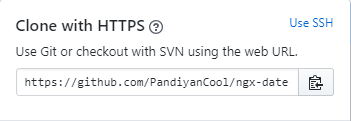
I used copy to clipboard option most of the time in Github,
And that’s the base story.
Why?
Few months back, I was supposed to implement the same feature in one of my angular application.
I’m aware that how to do this feature in plain JavaScript. The typical copy function will look like the below snippet
But I hesitated to follow the same structure.
Analyzed existing npm packages
I have gone through various npm packages for copy clipboard with following features expectation in mind
Copy icon should get automatically created
Selection & Copy function should be generic
The code should reused and light weight
Minimal effort to implement
Most of the npm plugins available didn’t fulfilled my expectation.
The popular plugin expected the developer to create and pass the text which needs to copied to the copy to clipboard function.
For me, this looks weird!
If a paragraph is having 100 lines, sending those entire text to a plugin doesn’t make sense to me. So I decided to create a angular directive based on my expectation.
Later, I published it as a separate npm package. And the package name is
Once you have published your library to npm, you can import your library in any Angular application by running:
$ npm install angular-clipboard-auto
and then from your Angular AppModule:
import { BrowserModule } from '@angular/platform-browser';
import { NgModule } from '@angular/core';

import { AppComponent } from './app.component';

// Import your library
import { ClipboardModule } from 'angular-clipboard-auto';

@NgModule({
  declarations: [
    AppComponent
  ],
  imports: [
    BrowserModule,

    // Specify your library as an import
    ClipboardModule
  ],
  providers: [],
  bootstrap: [AppComponent]
})
export class AppModule { }
Once your library is imported, you can use its components, directives and pipes in your Angular application:
<!-- You can now use your library component in app.component.html -->

<!-- Add attribute appCopy in your html code -->

<input appCopy type="text" #text1 value="hello world">

<!-- And refer font awesome in your index.html to view copy symbol -->

<link href="https://stackpath.bootstrapcdn.com/font-awesome/4.7.0/css/font-awesome.min.css" rel="stylesheet" crossorigin="anonymous">
That’s it!
TLTR;
All we have to do is
Add appCopy as attribute in text field HTML
Import fontawesome css
The copy icon will automatically get created next to your input field and you can use the feature right away.
The npm package will take care of all the background task seamlessly.
And also you can find the working copy of angular application in following path



 Efficient User