This is a small writing about the interesting error I have faced recently while debugging an angular app.
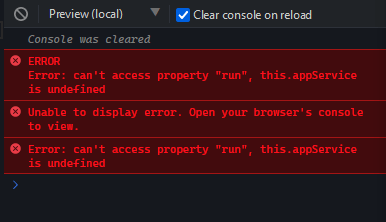
The following error shows up in browser console
💡 Error: can’t access property “run”, this.appService is undefined
this is a generic error shows up when we add one of the service as DI in our component.
The error is can’t access property or function, because particular service is undefined.
In my case, I have a function called run() which is present in appService
this.appService.run();
And the error showing in console is telling us that the code is trying to call undefined service’s function
undefined.run()
This is what the error telling to us.
You can use the following stackblitz link to try out and reproduce the issue
https://stackblitz.com/edit/angular-service-nzkubh?file=app%2Fhello.component.ts
In the below example, I have called particular function in the service.
export class HelloComponent {
  @Input() name: string;

  constructor(
    appService: AppService,
    private helloService: HelloService
  ) {
    this.appService.run();
    this.helloService.run();
  }
}
Issue
What was the issue?
From the above snippet, you could have noticed that I haven’t mentioned the access specifier of the appService.
This is why it is throwing issue in out console.
The issue resolved by setting up the access specifier of the appService in the constructor.
export class HelloComponent {
  @Input() name: string;

  constructor(
    **private** appService: AppService,
    private helloService: HelloService
  ) {
    this.appService.run();
    this.helloService.run();
  }
}
Explanation
When we prefix a constructor parameter with an access modifier, it is getting promoted as class property in Typescript.
Without any access modifier prefix the constructor parameter is just the method parameter. We should manually assign it to declared class property from the constructor.
Method #1
In the following snippet, we have added a class property and assigned the the parameter and used it later on.
export class HelloComponent {
  @Input() name: string;
  private _appService: AppService;

  constructor(appService: AppService) {
    this._appService = appService;
    this._appService.run();
  }
}
Method #2
In the following snippet, I have declared a class property name same as parameter name and used it later on.
export class HelloComponent {
  @Input() name: string;
  private appService: AppService;

  constructor(appService: AppService) {
    this.appService = appService;
    this.appService.run();
  }
}
Method #3
In the following snippet, I have added the constructor parameter with access modifier. Now no need to declare separate class property.
export class HelloComponent {
  @Input() name: string;

  constructor(private appService: AppService) {
    this.appService = appService;
    this.appService.run();
  }
}
Hope the above explanation is simple and helpful.
Cheers!
#HappyCoding
Source:

 Efficient User