Steps to make Adobe Reader to remember last visited page number

I’m using Adobe Reader to read pdf files for very long time. Recently, I have installed Adobe Digital Edition to view some files. I’ve experienced that, Adobe Digital Edition is remembering the page number which I’ve visited before and is available by default.

Adobe Reader also having this feature, but we need to enable this if needed.

So, here is the steps:

  1. Goto Eidt  -> Preferences or Ctrl+K
  2. Under Documents Category, Enable the option “Restore last view settings when reopening documents
  3. Click OK

pdf restore page number.png

Happy Reading 🙂

How to switch from “Inbox by Gmail” to “Gmail”

If we have activated “Inbox by Gmail” for our gmail account. The browser will automatically redirect our request to inbox.google.com instead of gmail.com.

If we visit gmail.com, the browser will load inbox.google.com by default.

We can use the following steps to revert back our default mail window to gmail.

Step 1:

Click the settings link from the left sidebar in the “Inbox by Gmail” page.

Step 2:

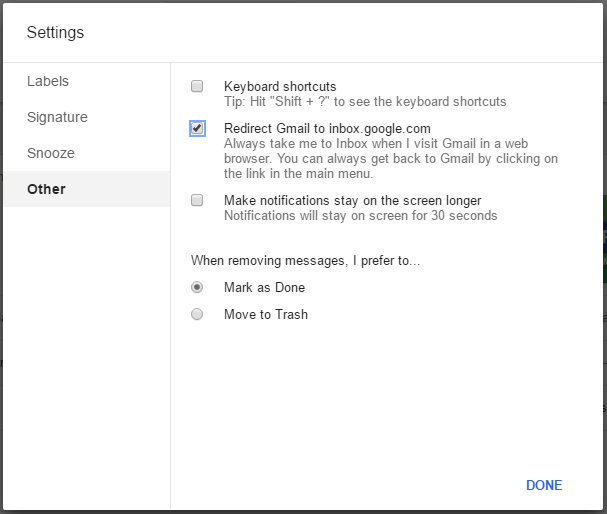
Click the “other” tab in the modal window which opened.

Capture

Step 3:

Uncheck the option “Redirect Gmail to inbox.google.com”


Now if we load gmail.com, the old gmail UI page will load.

At same, if we want to use the “Inbox by Gmail” we can directly visit inbox.google.com

🙂