How to disable automatic updates in firefox browser


Step 1:

Type following keyword in address bar of firefox and hit “Enter”. Advanced preference page will get open.

about:preferences#advanced

firefox 1.png

Step 2:

Switch to “Updates tab” in Advanced page.

firefox 2.png


Step 3:

By default, the “Automatically install updates” option has been checked.

Change it to Never Check for updates.

firefox 3


Note:

Choosing “Never check for updates” is not recommended by Firefox. If we chose this option, we have to manually check for updates.


Happy browsing ! 🙂
How to switch from “Inbox by Gmail” to “Gmail”

If we have activated “Inbox by Gmail” for our gmail account. The browser will automatically redirect our request to inbox.google.com instead of gmail.com.

If we visit gmail.com, the browser will load inbox.google.com by default.

We can use the following steps to revert back our default mail window to gmail.

Step 1:

Click the settings link from the left sidebar in the “Inbox by Gmail” page.

Step 2:

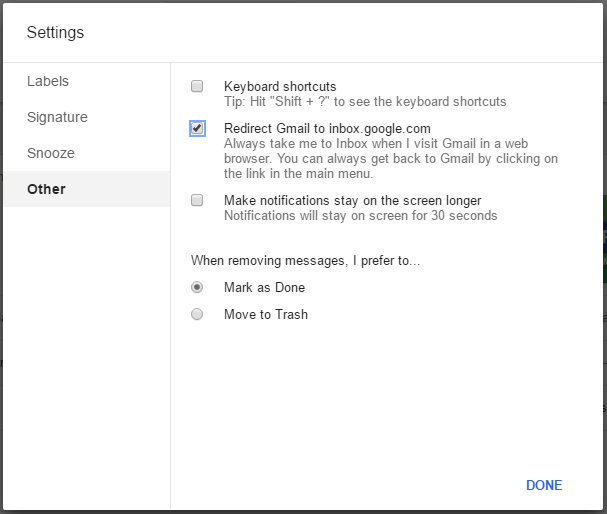
Click the “other” tab in the modal window which opened.

Capture

Step 3:

Uncheck the option “Redirect Gmail to inbox.google.com”


Now if we load gmail.com, the old gmail UI page will load.

At same, if we want to use the “Inbox by Gmail” we can directly visit inbox.google.com

🙂