Integrating a YouTube Player Component in Next.js: A Step-by-Step Guide

Introduction

Integrating a YouTube player component into your Next.js application can greatly enhance user engagement by allowing them to view and interact with video content directly on your website. In this step-by-step guide, we will walk you through the process of seamlessly integrating a YouTube player component using the YouTube Iframe API. By the end of this tutorial, you will have a fully functional YouTube player that can be easily customized and controlled within your Next.js application.

Steps

Setting up the Project

  • Begin by creating a new Next.js project or using an existing one.
  • Install the react-youtube package, a convenient wrapper around the YouTube Iframe API, using the command: npm install react-youtube.

Creating the YouTube Player Component

  • Create a new file called YouTubePlayer.js within your Next.js components directory.
  • Import the necessary dependencies:
import React from 'react';
import YouTube from 'react-youtube';

Define the YouTubePlayer component and its required props:

const YouTubePlayer = ({ videoId }) => {
  // Set up event handlers
  const onReady = (event) => {
    // Access the player instance
    const player = event.target;

    // For example, you can automatically play the video
    player.playVideo();
  };

  const onError = (error) => {
    console.error('YouTube Player Error:', error);
  };

  return (
    <YouTube
      videoId={videoId}
      onReady={onReady}
      onError={onError}
    />
  );
};

export default YouTubePlayer;

Implementing the YouTube Player in your Next.js Page:

  • Open the desired Next.js page where you want to integrate the YouTube player.
  • Import the YouTubePlayer component:
import React from 'react';
import YouTubePlayer from '../components/YouTubePlayer';

Include the YouTubePlayer component within your page component’s JSX:

const HomePage = () => {
  return (
    <div>
      <h1>Welcome to My Next.js App!</h1>
      <YouTubePlayer videoId="bmD-tZe8HBA" />
    </div>
  );
};

export default HomePage;

Customization and Further Development:

  • Customize the appearance and behavior of the YouTube player component by modifying the component’s JSX and the associated CSS.
  • Explore the YouTube Iframe API documentation for additional functionality and options that can be integrated into your Next.js application.

Conclusion

By following this comprehensive guide, you have successfully integrated a YouTube player component into your Next.js application. This dynamic addition allows users to view and interact with video content directly on your website, boosting engagement and improving user experience. Feel free to explore further customization options and extend the functionality to suit your specific requirements. With the power of Next.js and the YouTube Iframe API, you can create a captivating and interactive user experience on your website.

GitHub Repo: https://github.com/PandiyanCool/nextjs-youtube-player

Vercel Demo: https://nextjs-youtube-player.vercel.app/
Angular – Use of access modifier while injection of service

This is a small writing about the interesting error I have faced recently while debugging an angular app.

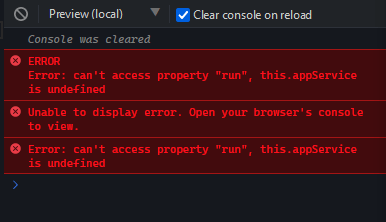
The following error shows up in browser console

💡 Error: can’t access property “run”, this.appService is undefined

this is a generic error shows up when we add one of the service as DI in our component.

The error is can’t access property or function, because particular service is undefined.

In my case, I have a function called run() which is present in appService

this.appService.run();

And the error showing in console is telling us that the code is trying to call undefined service’s function

undefined.run()

This is what the error telling to us.

You can use the following stackblitz link to try out and reproduce the issue

https://stackblitz.com/edit/angular-service-nzkubh?file=app%2Fhello.component.ts

In the below example, I have called particular function in the service.

export class HelloComponent {
  @Input() name: string;

  constructor(
    appService: AppService,
    private helloService: HelloService
  ) {
    this.appService.run();
    this.helloService.run();
  }
}

Issue

What was the issue?

From the above snippet, you could have noticed that I haven’t mentioned the access specifier of the appService.

This is why it is throwing issue in out console.

The issue resolved by setting up the access specifier of the appService in the constructor.

export class HelloComponent {
  @Input() name: string;

  constructor(
    **private** appService: AppService,
    private helloService: HelloService
  ) {
    this.appService.run();
    this.helloService.run();
  }
}

Explanation

When we prefix a constructor parameter with an access modifier, it is getting promoted as class property in Typescript.

Without any access modifier prefix the constructor parameter is just the method parameter. We should manually assign it to declared class property from the constructor.

Method #1

In the following snippet, we have added a class property and assigned the the parameter and used it later on.

export class HelloComponent {
  @Input() name: string;
  private _appService: AppService;

  constructor(appService: AppService) {
    this._appService = appService;
    this._appService.run();
  }
}

Method #2

In the following snippet, I have declared a class property name same as parameter name and used it later on.

export class HelloComponent {
  @Input() name: string;
  private appService: AppService;

  constructor(appService: AppService) {
    this.appService = appService;
    this.appService.run();
  }
}

Method #3

In the following snippet, I have added the constructor parameter with access modifier. Now no need to declare separate class property.

export class HelloComponent {
  @Input() name: string;

  constructor(private appService: AppService) {
    this.appService = appService;
    this.appService.run();
  }
}

Hope the above explanation is simple and helpful.

Cheers!

#HappyCoding

Source:

https://stackoverflow.com/questions/53075139/angular-6-use-of-access-modifier-while-injection-any-service